I’m Ian, tech-obsessed since I was eight. Let’s get you up to speed, fast.
For fun, I’m writing a short series about the parts inside your computer, one part at a time, and this one is the board that everything else plugs into: the motherboard.
What it is
The motherboard is the big circuit board inside a desktop or laptop. The processor, the memory, the storage and the ports all plug into it or connect to it, and it carries the signals and the power between them. Here’s the part that surprises people: it doesn’t do the main computing itself. Its job is to let every part of your computer talk to every other part, and to get power to each one while it’s at it.
A walk across the board
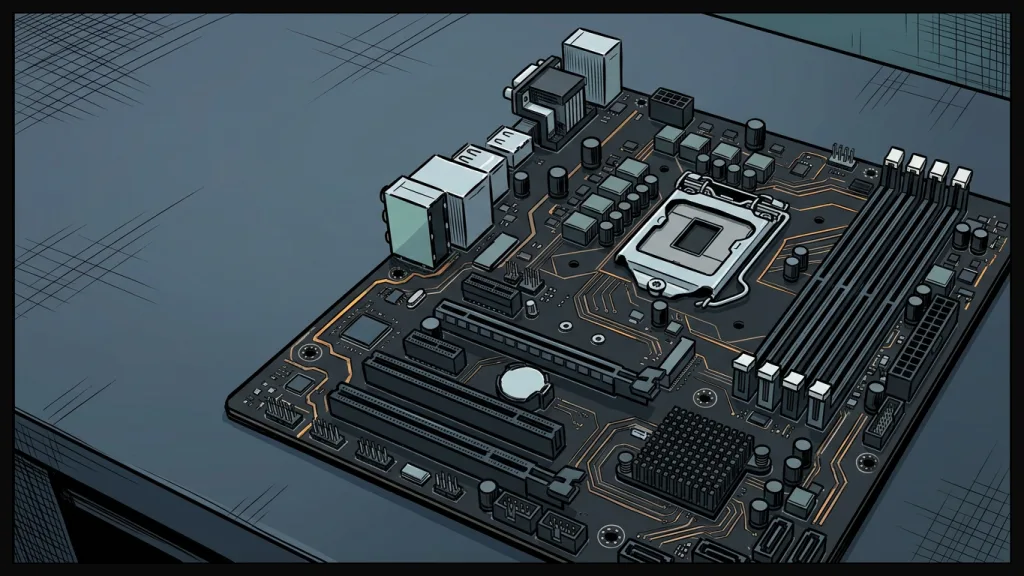
If you look at a desktop motherboard like the one in the picture, you’ll find the same areas on almost any of them. Near the middle is the CPU socket, where the processor sits. Right next to it are the RAM slots, the long thin slots for memory sticks. Close by are the storage connectors, where drives plug in, either with a cable or straight onto the board. Below those are the expansion slots, the long PCIe slots where you’d add something like a graphics card. And along one edge is a row of ports that come out the back of the case, for things like USB, video, the network and sound.
Think of it like a city
The easiest way I know to picture it is a city. The CPU is city hall, where the decisions get made. RAM is a courier depot, holding whatever’s being worked on right now, and storage is the archive building, where everything is kept for the long term. The expansion slots are empty lots you can build on later, and the ports are the roads leading out of town. None of that works without the roads, pipes and power lines that connect it all, and that’s the motherboard.
Why it matters
When someone says they’re upgrading their PC, they almost always mean something that plugs into the motherboard: more RAM, a new graphics card in a PCIe slot, or a bigger drive. The motherboard is what makes that possible, instead of needing a brand new machine every time. It also decides what you can add, since each board is built for specific processors and memory types. Laptops are more limited, because a lot of their parts are built onto the board and cannot be swapped.
What to remember
The motherboard isn’t a worker, it’s the grid everything else depends on, and each post in this series zooms into one part of the map we just walked.
Hope you found this helpful. You’ll find more free prompts and articles on dos2ai.com.
Want the next one by email? Sign up for free lessons.