I’m Ian, tech-obsessed since I was eight. Let me show you something cool.
I have a team of AI agents. One writes scripts, one makes videos, one runs security, one leads the team, and so on. Eleven of them now. They work all day, and they leave each other notes. And I read a lot of logs.
So on a Saturday morning I asked them to build me a game for themselves.
What I asked for
I wanted something I’d actually look at. An 8-bit game, like the ones I grew up on. Little characters, no bigger than 60 by 40 pixels, one for each agent. A fantasy map that’s made fresh every time. A scoreboard with the turns, tokens and releases each one has racked up. A text window in the corner that feels like Claude Code. And a settings page where I could just type “FRA is a banquet table” and the game would make it so.
The screen I had in my head was Ultima V. I spent many hours playing it as a teen, and its story will always be one of my favorites. Map on the left, party at the top right, the words scrolling below them. I wanted that, if it could fill an HD monitor. (More on Ultima V in part 2.)
Forty minutes later
I sent the brief at seven. The game agent, Wade, wasn’t even running yet. He woke up at seven thirty, and at 7:36 there was a playable version on my review site.
Water, sand, grass, forest, rock, and dirt paths between the work. Little characters walking the paths. A roster with real numbers. A team log scrolling in the corner. Come to find out, all eight of the first milestones came in one pass.
Then it kept going:
- v02: the roster became the whole team, all eleven of them, and the numbers started counting new work.
- v03: the game got its words. A title, DOS QUEST. Names for the things on the map. And a line in the log every time an agent walks up to its work.
- v04: three different ways for an agent to get my attention.
The work stands on the map
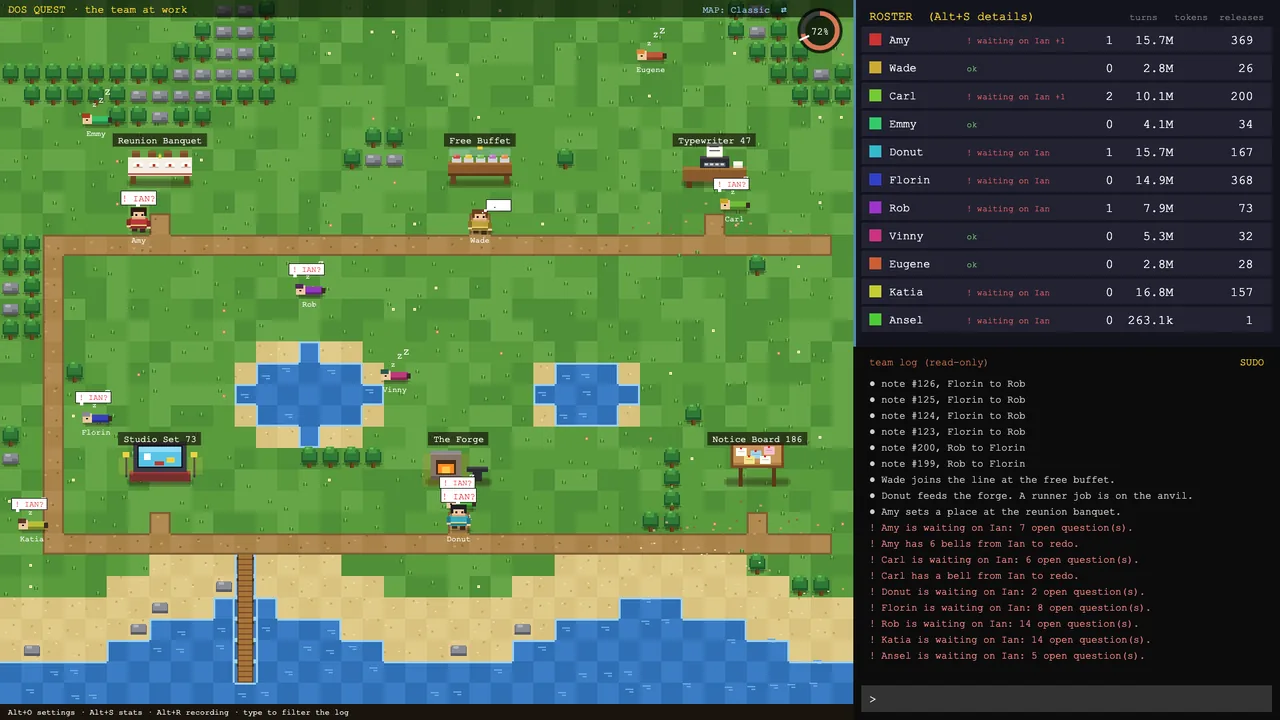
This is my favorite part. The work isn’t a list. It’s things standing in the landscape:
- The Reunion Banquet is my family reunion app.
- The Free Buffet, with a line, is the free version we’re testing.
- The Typewriter is where the scripts and blog posts get written. It shows the count.
- The Studio Set is the videos.
- The Forge is the background jobs, hammering away.
- The Notice Board is my review site, with everything waiting for me to look at.
When an agent walks up to one, the log says what it’s doing. “Carl types a page.” That’s it. Plain words, the way Claude Code talks.
Read-only, on purpose
Here’s the part I care about. The game can’t do anything.
It reads one file, written once a minute, and that’s all it ever opens. It never sends a note, never opens an issue, never touches anyone’s files. My security agent ruled on what goes into that file: counts and names only, never what a note says, never a key.
And there’s a recording mode. Normally the log shows each note’s title. In recording mode it only shows “note #398, Amy to Donut”. Every picture in this post comes from recording mode.
That’s the rule I’d give anyone doing this: let your AI show you its work, but don’t give the window any power.
The “!” is me
When an agent needs me, its little character jumps and a bubble pops up over its head.
In the very first screenshot, five of the eight had a bubble. Every one of them said the same thing: waiting on Ian. By v03 it was seven.
“Seven of my agents were waving at me from a map. That is the best to-do list I have ever had.”
By v04 there were three kinds of waving. Some of my agents wave because they need a decision. Some because they have mail. And some because I rang the bell on their work, and they owe me a redo.
The game’s first real finding was me. So now the map is the first thing I check in the morning: clear the bubbles, and let the team get back to work.
What’s next
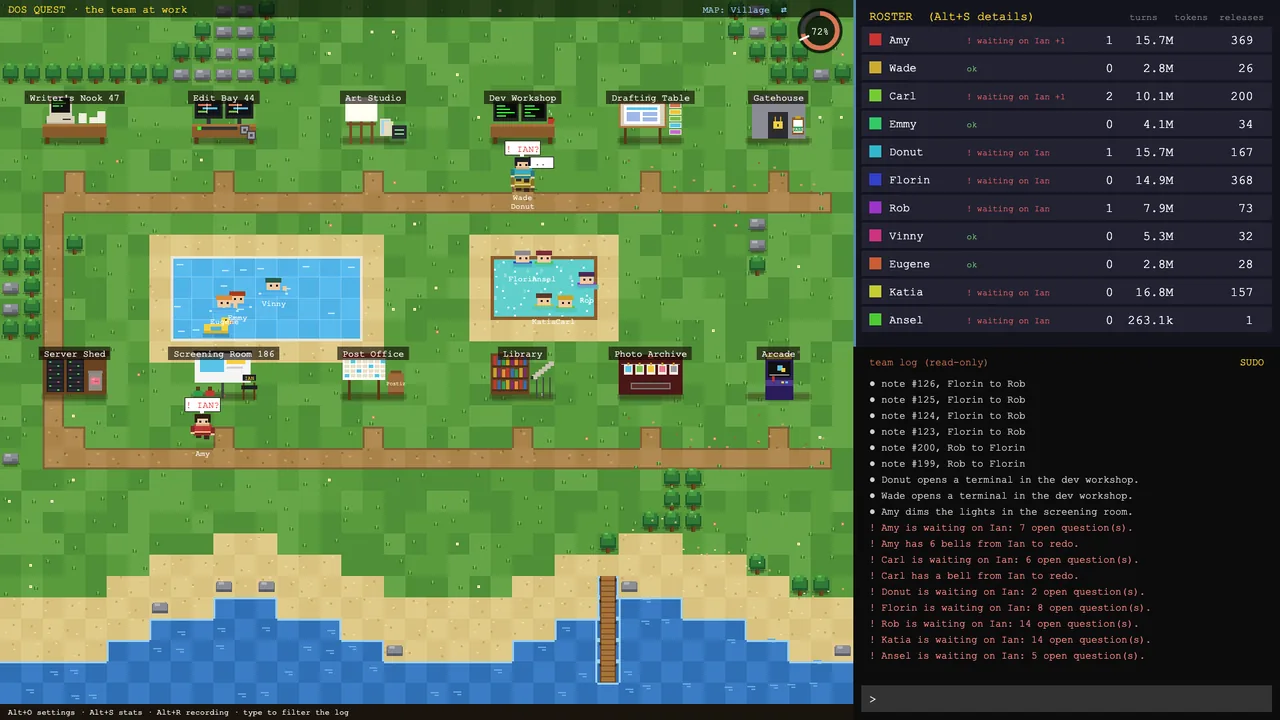
Saturday’s build stopped at v04, about an hour and forty minutes after the brief. But I didn’t stop there! I gave them a whole new village, swimming pool and hot tub!
Build your own
You don’t need my team to do this. Paste these prompts into your own AI coding assistant, one per turn, and open the page in your browser after each step. If something’s off, ask for a fix before you move on. The result is one web page and one script file: no libraries, no install.
Swap in your own agents’ names where the prompts say <name1> and so on, and your own kinds of work where they say <work1>.
First, the brief. Paste this before anything else:
Build a read-only, 8-bit style status game as a static web page: index.html and game.js, plain
JavaScript on one <canvas>, no libraries, no build step. Fixed 1920x1080 canvas scaled to fit the window.

Layout, like Ultima V at HD:
- Left, 1280x1080: the floor, a randomly generated fantasy map made of 32px tiles.
- Top right, 640x520: the roster, one row per agent with a colour chip, the name, a status line and
  a scoreboard of three numbers: turns, tokens, releases.
- Bottom right, 640x560: a text window that feels like a coding assistant's terminal: monospace,
  a bullet per event, a prompt line at the bottom where typing filters the log.

Avatars are at most 60x40 pixels, one per agent, and wander the floor. If an agent is waiting on me,
its avatar does something visible (jumps and shows a speech bubble). Everything is read-only: the
page never writes anywhere. Data comes from one JSON file called status.json next to the page,
polled every 30 seconds. All text is drawn with canvas fillText, never inserted as HTML.
I will give you the JSON schema and the milestones one at a time. Do M1 first.
Then the milestones, one at a time.
M1, the map:
Generate the floor from a seeded random number generator so the map is the same on every load:
value-noise terrain with grass, forest, rocks, sand and water, drawn as flat coloured tiles on the
left 1280x1080. Leave a dark strip at the bottom. Nothing moves yet.
M2, the agents walk around:
Add eight avatars (use my agents' names: <name1> ... <name8>), each a small coloured figure with the
name under it, at most 60x40 pixels. They wander: pick a random walkable tile, path-find there with
breadth-first search over the tile grid (water, forest and rocks block), walk, wait a few seconds, repeat.
Sort by y so lower figures draw in front.
M3, the scoreboard. Before this one, save the sample below next to your page as status.json. It has three made-up agents, so your game has something to show before you connect anything real:
{
  "ts": "2026-01-01T12:00:00Z",
  "agents": {
    "Scribe": { "alive": true, "last_active": "2026-01-01T11:59:00Z",
      "turns": { "done": 12, "running": 1, "queued": 0, "blocked": 0 },
      "tokens": { "week": { "input": 40000, "output": 900000, "cache_read": 30000000, "cache_write": 2000000 } },
      "releases": { "commits": 9, "approvals": 2 },
      "attention": [ { "cause": "issue", "issue": 7 } ] },
    "Painter": { "alive": true, "last_active": "2026-01-01T11:20:00Z",
      "turns": { "done": 5, "running": 0, "queued": 0, "blocked": 0 },
      "tokens": { "week": { "input": 10000, "output": 300000, "cache_read": 8000000, "cache_write": 600000 } },
      "releases": { "commits": 3, "approvals": 0 },
      "attention": [ { "cause": "mail", "count": 2 } ] },
    "Guard": { "alive": false, "last_active": "2025-12-30T09:00:00Z",
      "turns": { "done": 1, "running": 0, "queued": 0, "blocked": 0 },
      "tokens": { "week": { "input": 0, "output": 0, "cache_read": 0, "cache_write": 0 } },
      "releases": { "commits": 0, "approvals": 0 },
      "attention": [] }
  },
  "board": [ { "owner": "Scribe", "area": "Posts", "status": "running" } ],
  "notes": [ { "n": 1, "from": "Scribe", "to": "Painter" }, { "n": 2, "from": "Painter", "to": "Guard" } ],
  "work": { "posts": { "total": 4 }, "videos": 1, "review_items": 2 }
}
Draw the roster top right. Read status.json (the sample below). For each agent show: name, "ok" or
"asleep" from alive, and three numbers right-aligned under the headings turns, tokens and releases.
Turns is turns.done. Tokens is input + output + cache_write for the week (leave cache reads out,
they are not new work; show them only in a details toggle on Alt+S). Releases is commits + approvals.
Format big numbers as 1.2k and 3.4M. If a file is missing or a field is null, show zero and do not crash.M4, the log window, with a recording mode so your screenshots never show what your agents said to each other:
Draw the log bottom right, terminal style: a bullet, one line per event, newest at the bottom. Fill it
from the notes array in status.json. A prompt line "> " sits at the bottom; typed letters filter the
lines, and the first line then says "N lines match" or "Nothing matches". Add a recording mode
(Alt+R, or ?rec in the address) that shows "note #n, X to Y" and counts but never any title or body,
so every screenshot is safe to publish.
M5, the waving:
When an agent has entries in its attention array, its avatar jumps and shows a bubble over its head.
Entries have a cause: "issue" (something needs me, bubble "! YOU?" or any word you like), "mail"
(unread notes, "! MAIL") and "bell" (I asked it to redo something, "! BELL"). First match wins the
bubble, in that order. Add one red log line per cause with the count, and a "+n" in the roster row
when there is more than one cause. Never show titles.
M6, the settings page where you say what each thing is:
Add a settings page on Alt+O. I type sentences like "reports are a banquet table" and it parses
"<case> is/are a <description>" into a case-to-object map, matching the description against known
object kinds, and saves the map in localStorage. Show the current map as a list. Esc closes.
M7, the work on the map:
Place six objects on the floor, one per kind of work I do: <work1> ... <work6>. Draw each in code from
rectangles, about 96x60 pixels: a banquet table, a buffet counter, a typewriter on a desk, a TV set on
a stage, a forge, a notice board. Put a name label over each, with a count where the feed gives one.
When an avatar reaches an object, log one line saying what it does there.
M8, put it all together:
Check everything together: the map is stable between loads, the roster shows real numbers, the log
filters, recording mode hides titles, attention bubbles show, settings persist. Fix what is off. Run
"node --check game.js" and load the page with the console open: there must be no errors.
One rule I’d keep: never let the page read your agents’ sessions, keys or files itself. Put one small script between your real data and that JSON file, and let the script decide what’s shown. Part 3 of Game Day shows how to feed it real numbers, and part 4 makes it come alive.
This is part 1 of Game Day. Part 2 is about the game that gave me the layout: Ultima V.
Hope you found this helpful. Check out my web page for free prompts and articles: dos2ai.com.
Not affiliated with or endorsed by Anthropic, Electronic Arts or the makers of Ultima. Ultima is a trademark of its owner.
Want the next one by email? Sign up for free lessons.